
Last year (starting with Prism Central 2023.4 / AOS 6.71) Nutanix added the ability to centrally manage the local users (admin and nutanix) on AOS clusters and Prism Central itself through the PC GUI.
Really useful for getting rid of that pesky “CVM xx.xx.xx.xx is using default password” alert

without going to the command line, it also lets you update the local user password on all* your clusters with one click. (*well, up to 10 clusters at a time)
I’m using PC 2024.2, but I’ve updated this for some minor GUI changes to 2024.3.
You can find “Local Account Password” under Infrastructure/Network & Security
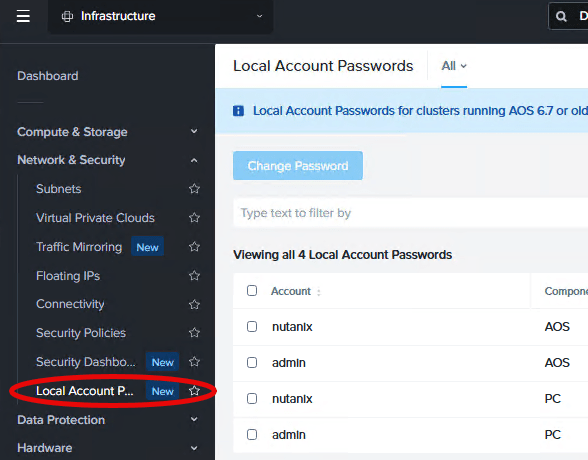
Note that 2024.2 has it as “Local Account Passwords” and 2024.3+ has “System Account Passwords” and 2024.3 also changed the way the components are identified (CVM/Prism Central).

Now click on one user name/component to update – you can click on the same user name/component (so admin/PC) for multiple clusters but you cannot select more than one name or component (so no admin/PC + admin/AOS).
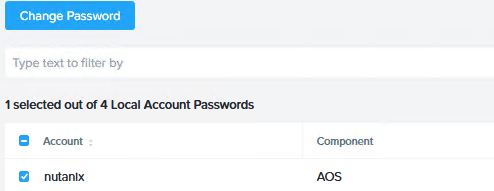
And click Change Password. If you can’t click Change Password you have selected more than one username or more than one component.
Enter the current and next passwords and hit Change Password (again)
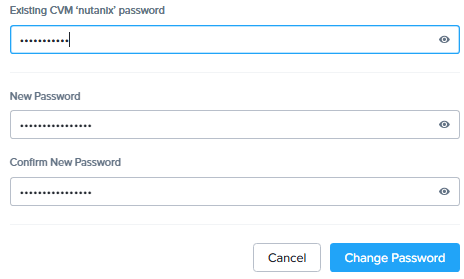
Note that PC 2024.3+ will also show the password rules in effect.

As an added bonus, Nutanix would really prefer you not to use password-based SSH and have added a new alert when you have not enabled Cluster Lockdown.

The cluster is using password based ssh access for the cvm xx.xx.xx.xx
The PC is using password based ssh access.
